Wednesday, September 22, 2021

Slowly moving to the G6

 Finally Picked up a few G6's.  Still on the G4 until next year, but I had a chance to get an ESP32 to talk to the thing.  So, hopefully, when I finally have to downgrade, I can at least keep the functionality I want.

New device, ESP32 TinyPico, total size 1 3/4 square and about the thickness of a cell phone, perfect.  Battery life was around 17 hours, it's a power hog.  Nice feature is the pico has onboard lipo management ie. charging.


Tuesday, February 16, 2021

New Gadgets


Trying out the Bangle and the Puck.  Both support BLE, so might be able to Pair with a G6.

We will soon find out.  Bangle is really big, also need to see what the battery life is.  The Puck could replace the custom device I carry around, it's slightly smaller, but I'd be burning up Cr2032's.  I could live with 1 a week for the size improvement.  In either case, these would replace a cellphone.

Monday, October 14, 2019

Adding the Amazfit Bip


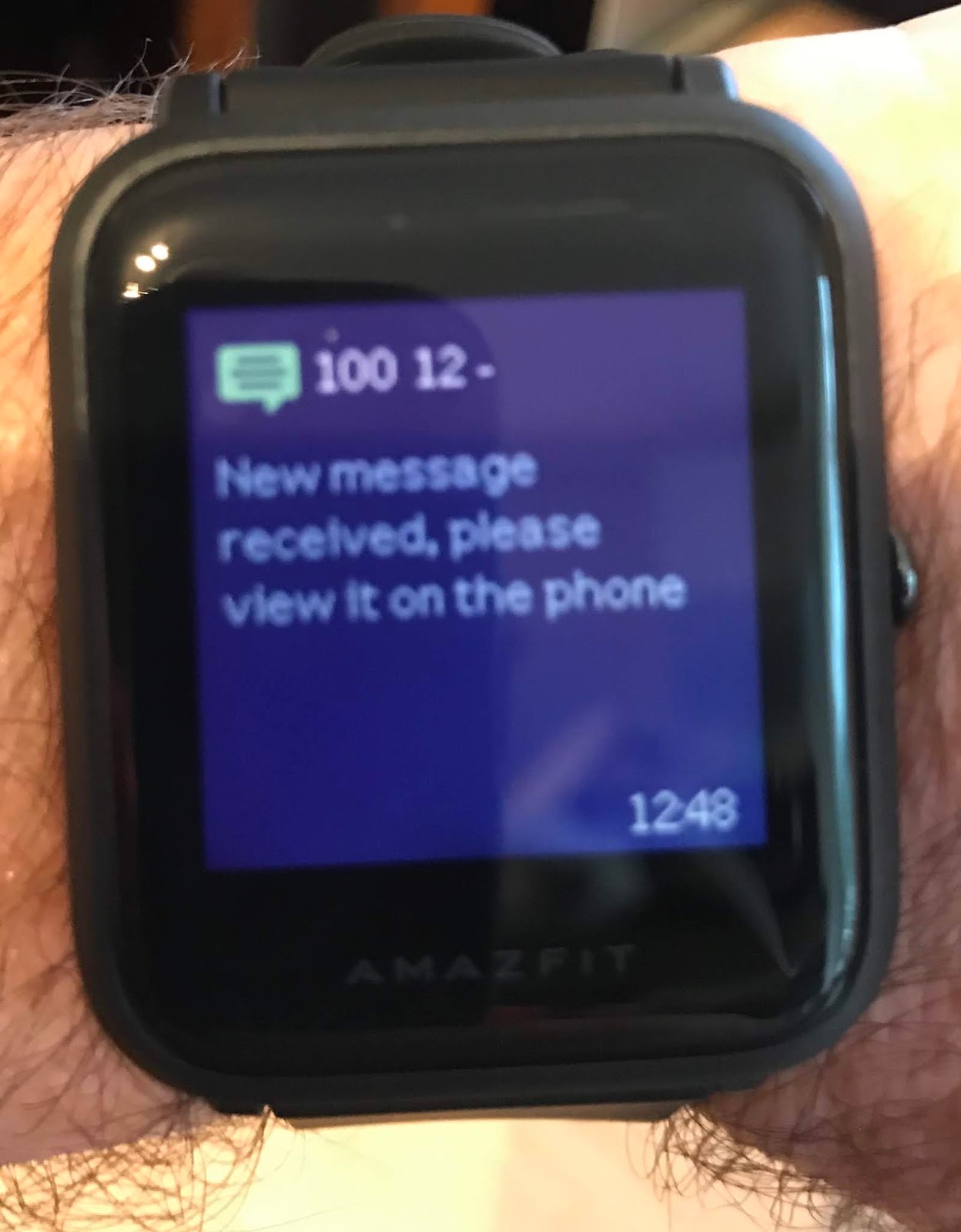
Here's the Amazfit Bip Watch.  Example of the regular watch face and notifications.  The notification is, estimate 100 mg/dl, 80 mg/dl in 12 minutes, falling.

This continues to be a battle to stay ahead of product obsolescence.  My Amazfit Band died after 10 months.  It would no longer charge.  The root problem was most likely that it was no longer waterproof.  The thing basically fell apart in my hand while I was trying to attach the charger.

Potentially tricky using the Amazfit products now.  The new firmware requires a server generated key.  So, you have to activate the watch with your phone, using the MI app.  But don't let the app update your firmware, when it starts to do that, close the app.  Then go to Arduino and do the pairing as you normally(how much of this is normal?) would.  A shame, there's allot of interesting functionality on this watch, but I can't use it.

On deck, I'm messing around with the Ticwatch, which is Wear OS, which used to be Android Wear.  This isn't going well.  Like my previous battle with Android Wear, I can't keep bluetooth up for more that 6 hours, at some point the watch decides it's inactive and shuts everything down.  You can't restart bluetooth without rebooting the watch.  On top of that, ambient mode changed, and the watch is only good for about 11 hours.  It's also clunky and huge.  The cool thing with this project is calibration can be performed on the watch.  Almost back to the functionality I had on the Pebble Round... So close, yet so far.

---10/15/2019 Update----
Way to many features on this watch to not risk letting it update it's firmware.  Did not remove my pairing, so good to go.

---10/19/2019
Continue to be amazed with this watch.  Battery is going to last nearly 2 weeks.  Using the GPS on runs, integrates with Strava.  I'll probably ditch the Vivosmart in the near future, although I do like the Garmin software.  Updated the fonts to Bold, can easily read it now.  Don't think I'll be wasting anymore of my time on Wear OS/Android Wear.  Why deal with a wearable that requires daily charging?

Monday, September 30, 2019

Joys of iPhone Updates

The recent iPhone update really screwed with my iPhone app.  Have to renew my Dev license and see what's up.

App works if I leave it open, and close the phone.  
Sometimes, it appears that is goes to sleep, no glucose readings are evaluated, until I open the phone, then it instantly reconnects and pulls in a value.  Maybe I backgrounded the app in this case.

It's really bad at discovering the bluetooth device now.  It will scan for about a minute and then shut down.  I don't think it will connect at all from the background.

And all of this behavior varies.  Best bet is to keep it wide open, with the screen on, if I need to use it.

Thursday, September 19, 2019

Wahoo Elemnt as a CGMS

Or really, any BLE compatible HR Monitor.


Was doing a mountain bike race this weekend, and was once again reminded of how I'd like glucose on a display I could easily see.  The watches, fitness bands etc.  don't show up very well in bright daylight.

This is something I'd wanted to do with ANT+ years ago, but there wasn't any convenient dev board, and I'm not sure if I ever worked out how to appear as a HR Sensor.

This is much easier to do with bluetooth.  Since I'm using the Adafruit NRF Feather, it was easy to lift their sample code for the custom_hrm.  And you see it above.  I can now track my blood sugar from my handlebars, 169 in this case.

9/30/2019 This is good up to 229, then it wraps around and/or doesn't reliably show a number.

Wednesday, January 23, 2019

Adding the Amazfit Cor


So, I use reading glasses.  The MI Band 2 is hard to see at times.  In the middle of the night and while driving, the notification will go away before I can focus.

According to Gadgetbridge, the Amazfit Cor uses the same "OS" as the MI, so I picked one up.  I can definitely read the display. 

Added bonus, you can go to the notification screen and review the past 10 messages, which is nice since the MI just erases them after 2 seconds.

Wednesday, November 21, 2018

Standalone fitness band

I now have a MI Band displaying Glucose without a paired iPhone.  You just need the iPhone to push the calibration details to the device.

Lots to do here:
  1. Get the CC2500 code working on the Feather (SPI protocol)
  2. Get central to MI communication working.  Adapt what people have done in Python, to work on the Arduino.  See https://medium.com/machine-learning-world/how-i-hacked-xiaomi-miband-2-to-control-it-from-linux-a5bd2f36d3ad for a start.
  3. Also code the peripheral side so the feather can communicate with an iPhone, pushing the isig and retrieving the slope/intercept.
  4. Build the circuit
  5. Print a container
  6. Get a reasonable battery life


First started with everything on a breadboard, Feather NRF52 and a CC2500 board on a breakout.

Getting the CC2500 working wasn't too bad.  Only some question as the where the Chip Select/Slave Select pin was on the feather.  I recently found some mention that it was A8.  My code has it on A3, since I couldn't find where it was mapped initially.

Central to MI took allot of time, knew that going in.  To really understand what was going on, I had to get that working first in Python on a Raspberry PI.  This guy had a great script: https://github.com/vshymanskyy/miband2-python-test .  

Hardest part of the conversion is doing the AES 128 ECB encryption for the key exchange with the MI.  This reminded me of communicating with the Dexcom back at the start of this blog where you had to calculate a CRC.  In either case, there are lots of methods available, and lots of public implementations that may or may not work.  I probably tried 10...  In the end this did the trick.
Finally, very little out there for Central samples.

The peripheral side of things was tricky for me because of the way the iPhone caches BLE Characteristics.  For a couple of days, I could enumerate my new characteristics from Linux, but the phone, and xCode and light blue wouldn't show anything.  Turns out you need to restart your phone.
Modified my iPhone app to work with the new device and finally display the dexcom transmitter battery level.

With that, squeezed together a circuit:


I may do a PCB in the future, I don't trust the wires.  Also, would have been allot easier.  The connections on the CC2500 are very small, not easy to solder to.

And printed another box, 2.25 x 1.6 x 0.4 (inches)


First week, could only get 12 hours on a charge.  That works out to 9 ma/hr.  Broke out the current measuring apparatus and started watching things.  My initial central only sketch was hitting 9ma on pairing then settling down to 3ma, but the full code base was fluctuating between 9ma and 13ma after the first CC2500 receive event and refusing to drop below 9ma.  Hmm.
Did some desperation googling, found a Nordic post on how some low level errors will prevent the Microcontroller from ever entering low power mode.  A note here, you can run the NRF52 in debug mode and get some extra detail in the serial monitor.  In this case, I noticed a few unhandled error messages, that don't crash the micro, but they prevent low power mode.  An example of one, would be attempting to connect to a peripheral after you've already established a connection.  The central examples that come with the feather are prone to this...  Fixed these issues, battery life is now 3 ma/hr or lower.  Codewise, doesn't appear that waitForEvent has any impact on battery, delay does.
99% of the time, the device is at 2.5ma, the CC2500 uses 27ma for 2 seconds every 5 minutes, and communication with the MI costs 9ma for a few seconds every 5 minutes or much much less, since I don't send value every 5 minutes unless the current glucose level is a concern.

Nothing to be gained space wise, so no point going to a smaller battery, done.

Display is a bit small, and the regular notifications are cleared very quickly.  The real alerts vibrate until dismissed so you'll get to read those without issue.  Like the VivoSmart, I'm not displaying glucose in the traditional manner.  Example, if my blood sugar is in range, and not at risk of being high or low in the foreseeable future, nothing is sent to the band.  If I'm really paranoid I can always check on the iPhone.  Battery life on the MI is weeks.  You can also still connect to MI Fit to get your step counts, although I don't let it pair.
See my github for the code.